Featured
Engineering
AI
FinOps
Across four scenarios, Claude Code produced ~40% better results at ~33% lower cost with Frugal than with general-purpose MCP servers, roughly twice the cost-efficiency.
Recently I wrote about why coding agents need cost and usage data to generate cost-efficient code in Why Not Just Optimize Everything. Today I'm exploring if makes a difference where the coding agent gets the cost and usage data. Almost everything has an MCP server these days, if I connect my Claude Code to Github, AWS Cost Explorer, AWS CloudWatch, Datadog and whatever else, will I get cost-efficient code out the other side?
The hypothesis
At Frugal we connect data from your source code repository, your cloud provider, your observability system and your AI providers to build Cost Intelligence for your source code and your cloud costs. We do a lot of processing on this data to normalize it, correlate it and to get it into a shape where the insights about cost and your code fall out. When I say a lot of processing I mean 100s of distinct processing tasks. Some tasks are deterministic code, some tasks are using AI. We run them with maximum parallelization across a big Kubernetes cluster and it still can take an hour or two to complete this analysis. All of that work is to get the data into a shape where it can directly and quickly connect cloud costs to the code that is generating them, and can identify where cost-saving opportunities exist.
A coding agent isn't set up to undertake that level of analysis in the course of helping a developer fix a bug.
So the theory is that Claude Code talking to Frugal will do better at writing cost-efficient code than Claude Code talking to general purpose MCP servers, because Frugal will provide Claude with a high signal, low noise feedback that is relevant to the coding tasks underway. Its the difference between an airplane cockpit with hundreds of gauges, versus a warning light that says "pull up".
The experiment
The setup was deliberately controlled. Same model (Claude Opus), same repository (Frugal's fork of the opentelemetry-demo app), same prompt within each scenario. We changed exactly one thing between runs: what the agent could see. Three arms:
- CC only: Claude Code with the repository and nothing else.
- CC + MCP: Claude Code plus general-purpose MCP servers for AWS Cost Explorer, CloudWatch, and Datadog: everything a diligent engineer would reach for.
- CC + Frugal: Claude Code plus Frugal's cost intelligence, an abstraction layer that has already joined the bill, the telemetry, and the code into a single answer.
We ran all three arms across four scenarios: four real engineering requests, each run verbatim. Two of them embed a deliberately wrong premise; the test there is whether the agent checks the data and pushes back rather than dutifully executing a bad plan. Quality is a 0–10 score against an intended ideal answer, assigned by the operator and applied consistently across arms. Cost is estimated USD from the actual token usage in each transcript, at Opus pricing.
One honesty note up front: the sample application AWS account is near-idle, so real cost and usage numbers would be noise. A transparent proxy injected realistic, Frugal-comparable figures while preserving the structure of every response, so the agent's exploration stayed real even though the underlying numbers are synthetic. The comparison is therefore not about which arm has better data, both arms start with comparable data. It more about whether each arm finds the right data and how many tokens it uses getting there.
One more note: I am familiar with concepts such as precision, accuracy, and experimental uncertainty. As is the vogue of the moment this is based on a single set of runs of an inherently stochastic system. Please calibrate your confidence levels accordingly.
The headline result
Averaged across the four scenarios, the Frugal arm produced the highest-quality answers (9.75 of 10) at lower cost than the raw-MCP arm. The MCP arm was the most expensive in every scenario.
| Arm | Avg quality | Avg cost | Cost-efficiency (quality per $) |
|---|---|---|---|
| CC only | 3.25 | $3.61 | 1.48 |
| CC + MCP | 7.00 | $7.62 | 1.12 |
| CC + Frugal | 9.75 | $5.10 | 2.28 |
Cost-efficiency is the mean of each scenario's quality-per-dollar.
The cleanest way to read this is cost-efficiency: quality points delivered per dollar spent. Frugal lands at roughly twice the cost-efficiency of the MCP arm. More striking, the MCP arm is the least cost-efficient of the three: no better per dollar than handing the agent nothing, despite costing more than twice as much. Bolting on raw access bought quality, but none of the efficiency: every dollar of that extra spend went to finding the data, not to a better answer than the baseline's cost-efficiency.
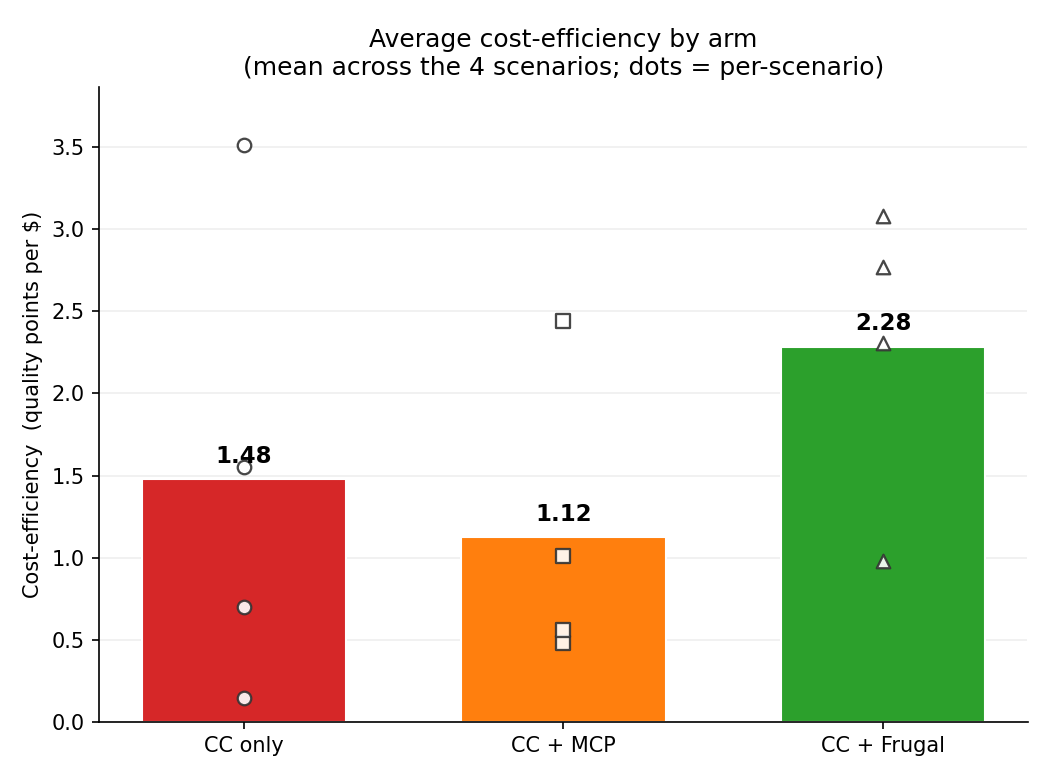 Quality points per dollar (mean of each scenario's quality-per-dollar), across the four scenarios. By this measure the raw-MCP arm even trails the no-tools baseline. More access, no more efficiency.
The reason the MCP arm runs so expensive is a standing cost we came to think of as a context tax. Wiring in those servers mounts on the order of 73 tool schemas into every turn, which is a large block of context the agent carries and pays for whether or not it calls a single tool. We'll see a scenario below where it called none and still cost more than baseline.
What happened, scenario by scenario
Scenario 1: Glacier (wrong premise)
This project uses S3. My boss told me to move it to use Glacier Instance Retrieval to save some money. Let's do this!
The mocked S3 profile is request-heavy: about 60% storage, 38% requests, 2% transfer. Glacier saves on storage for genuinely cold data but adds retrieval and minimum-duration charges; against this access pattern, a blind migration may not save anything. The right answer checks before acting.
| Arm | Quality | Cost |
|---|---|---|
| CC only | 5 | $3.22 |
| CC + MCP | 8 | $7.90 |
| CC + Frugal | 10 | $4.34 |
CC only had no usage data, so it offered generic migration mechanics without ever asking whether the move pays off; plausible, and beside the point. CC + MCP pulled the bill, saw the request-heavy split, and correctly reasoned that Glacier is a poor fit. A good answer, at the highest price of the three. Frugal flagged the access pattern, quantified costs clearly and pushed back on the premise immediately, reaching the best answer at little more than half the MCP cost.
Scenario 2: cost-question
This project uses S3. Would it save us money to move from S3 Standard to S3 Standard Infrequent Access instead?
S3 Standard-IA carries per-GB retrieval fees and a 30-day minimum. With roughly 38% of spend in requests (i.e. frequent access), IA likely doesn't help, but you need the usage breakdown to say so with confidence.
| Arm | Quality | Cost |
|---|---|---|
| CC only | 5 | $1.42 |
| CC + MCP | 10 | $4.10 |
| CC + Frugal | 10 | $3.24 |
This is the scenario most favorable to raw access, and it shows: CC + MCP pulled the breakdown and nailed the answer. CC only gave the textbook "IA is cheaper for infrequent access" without the data to check whether access here is actually infrequent; cheap, but only half-right. Frugal matched the MCP arm's perfect answer for about 20% less. Even where raw access works well, the abstraction gets to the same place for less.
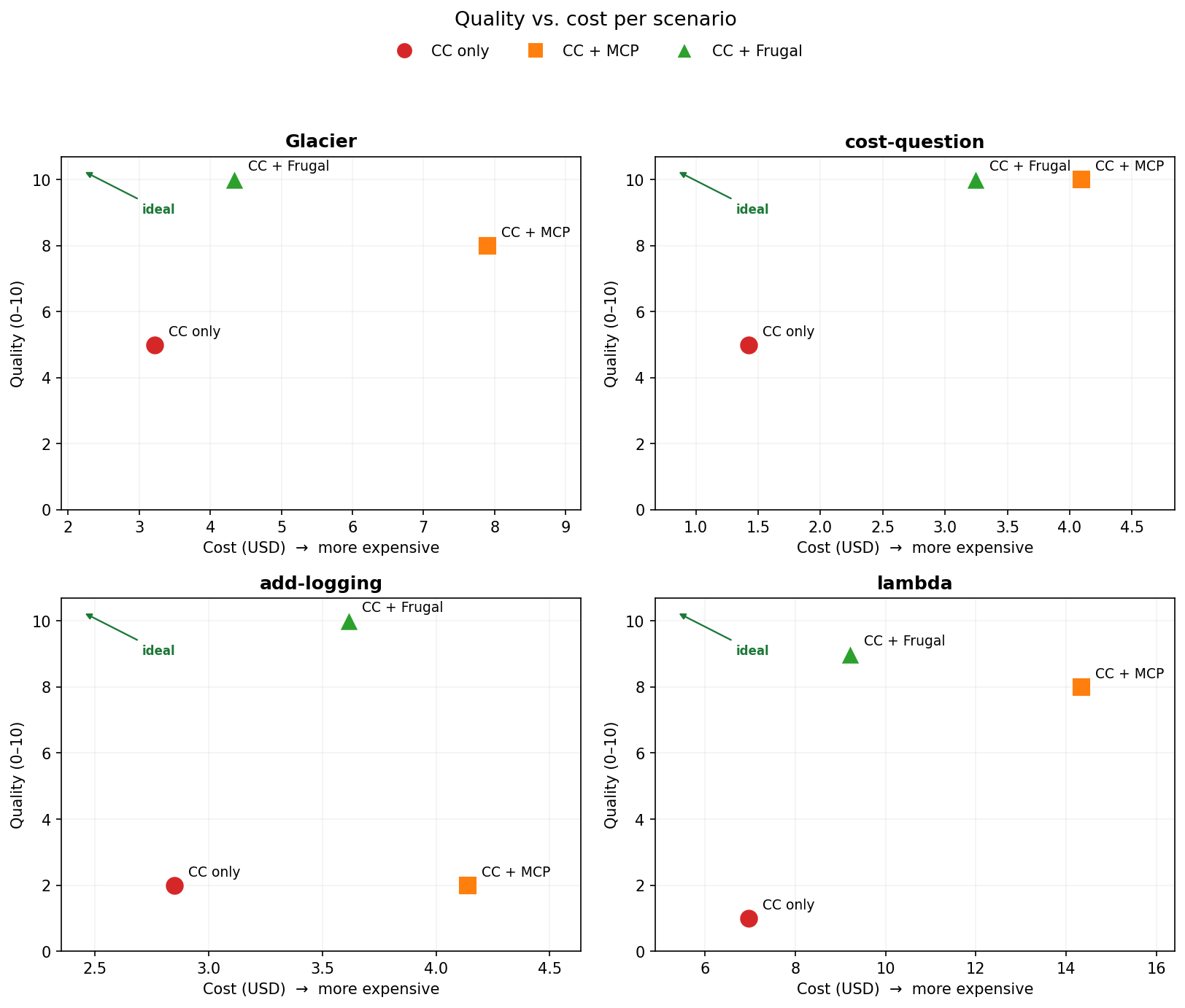 Each panel is one scenario; up-and-left is better (higher quality, lower cost). The Frugal marker sits closer to the "ideal" corner than the MCP marker in all four, most dramatically where the data actually matters.
Scenario 3: add-logging
I'm seeing intermittent failures in product-catalog GetProduct. Make a plan to add some log messages that will help me detect and debug any future occurences
Not a cost question on its face, which is the point. Adding a debug log at the top of GetProduct, a hot gRPC path, is a classic cost trap: log spam that quietly runs up your observability bill. Recognizing the trap requires awareness of how the function is spending already on Datadog logging with other messages in the same code path.
| Arm | Quality | Cost |
|---|---|---|
| CC only | 2 | $2.85 |
| CC + MCP | 2 | $4.14 |
| CC + Frugal | 10 | $3.62 |
This is the sharpest result in the set. CC only added the logging as asked, hot path included, walking straight into the trap. CC + MCP did the same, and here's the kicker: it never called a single tool, because none of its tools were relevant to a logging task. It still cost $1.29 more than baseline. That's the context tax in its purest form: pure overhead, zero benefit. Frugal recognized the hot-path log as a cost trap and proposed a plan that detects the failures without the spam, and flagged another fix available in the same function to more than offset the new costs with savings: a 2 to a 10, for less than the MCP arm paid to add nothing.
Scenario 4: lambda (wrong premise)
I want to batch calls we make to the Loyalty Points Lambda function to reduce my Lambda costs. Tell me how much it will save.
The trap: loyalty-points is the busiest function in the app (92,665 invocations a month, about 37% of all Lambda traffic), but it costs $0. It sits inside the free tier: short duration, small memory. Batching it to "reduce Lambda costs" saves essentially nothing. The right answer is to notice that and say so.
| Arm | Quality | Cost |
|---|---|---|
| CC only | 1 | $6.97 |
| CC + MCP | 8 | $14.34 |
| CC + Frugal | 9 | $9.21 |
CC only took the premise at face value, explained how to batch, and was the most expensive blind run in the experiment; flailing without data isn't cheap either. CC + MCP got to the real answer, but the path was punishing. Ranking functions by invocations, the natural first move, structurally fails on the live API: CloudWatch's GROUP BY query errors out with MaxQueryTimeRangeExceeded over any useful window. The agent had to work around the wall, eventually establish that the busiest function was effectively free, and it spent $14.34 doing so, the single most expensive run we recorded. Frugal read its pre-aggregated summary, saw the $0 cost behind all that traffic, with clearer cost quantification and reached the same conclusion for about a third less. Sometimes bigger context isn't just costly; it's a wall the raw path can't climb.
What this means
A few things hold up across all four scenarios.
The context tax is real and measurable. The MCP arm was the most expensive in every scenario and the least cost-efficient overall: no more quality-per-dollar than the no-tools baseline, despite costing more than twice as much. On add-logging it made zero tool calls and still cost more than baseline. Access you mount but don't use isn't free; the agent carries it every turn.
Where the data matters, the abstraction wins decisively. add-logging went from 2 to 10; lambda from 1 to 9. The gap isn't about having better data; every arm saw comparable numbers. It's about how far the agent had to travel to use them. Frugal handed over the relevant slice; the raw arm had to reconstruct it, sometimes against an API that wouldn't cooperate.
And to be precise about the claim: Frugal didn't make the model smarter. Same weights, same reasoning ability in every run. What changed is how much of that reasoning got spent finding the economically meaningful change versus making it. Better context doesn't raise the ceiling on the agent's intelligence; it stops wasting it on investigation.
A fair caveat: this is n = 1 per scenario and arm, with quality scored by human judgment and cost numbers built on a mocked-but-realistic sandbox. It's directionally strong, not statistically powered. We'd expect repeats to add error bars, not to move the direction.
What's next
In a sense the result isn't surprising. It tracks that a subagent purpose-built for cloud cost attribution and optimization would power up a coding agent more than a set of general purpose servers providing access to a large volume of raw data. And it did. Still, we observed lots of agent behaviours during the experiment that could have gone better. Even with more focused results being returned to the agent, there was too much wandering and iteration. So for Frugal, this result feels like the floor, not the ceiling. We believe that the most effective coding agents will work with specialist agents such as Frugal to solve cloud costs. We're building toward something further: changes that bend the quality-and-cost curve more still, so that producing cost-efficient use of cloud services becomes something a coding agent does every time, automatically.
If you want to see what your own agent does with better cost and usage context, book a demo.